
MailPoet is a powerful tool for managing email communications on your WordPress site, but it currently has limitations on sending to multiple recipients in one go. Specifically, CC, BCC, or multiple TO addresses aren’t supported directly within MailPoet. We know this can be a bit of a roadblock if you’re looking to notify several people at once. Here are some effective workarounds to help you get the job done.
Why This Limitation?
First, a quick look at the why: MailPoet’s email system is optimized for newsletter sending and subscriber management rather than complex distribution to multiple admin addresses. For users needing more flexible options, we’ve outlined some ways to make it work.
Workarounds for Multiple Recipients:
1.
Use Automations for Quick Notifications: MailPoet’s Automations feature is a handy workaround if you want to notify a few people about key events, like new sign-ups or WooCommerce orders. Here’s how to set it up.
- Trigger: Choose an event, like “Someone Subscribes” or “Order Status Changes.”
- Action: Select Send Notification Email.
- Recipients: Enter up to 5 email addresses you’d like to notify.
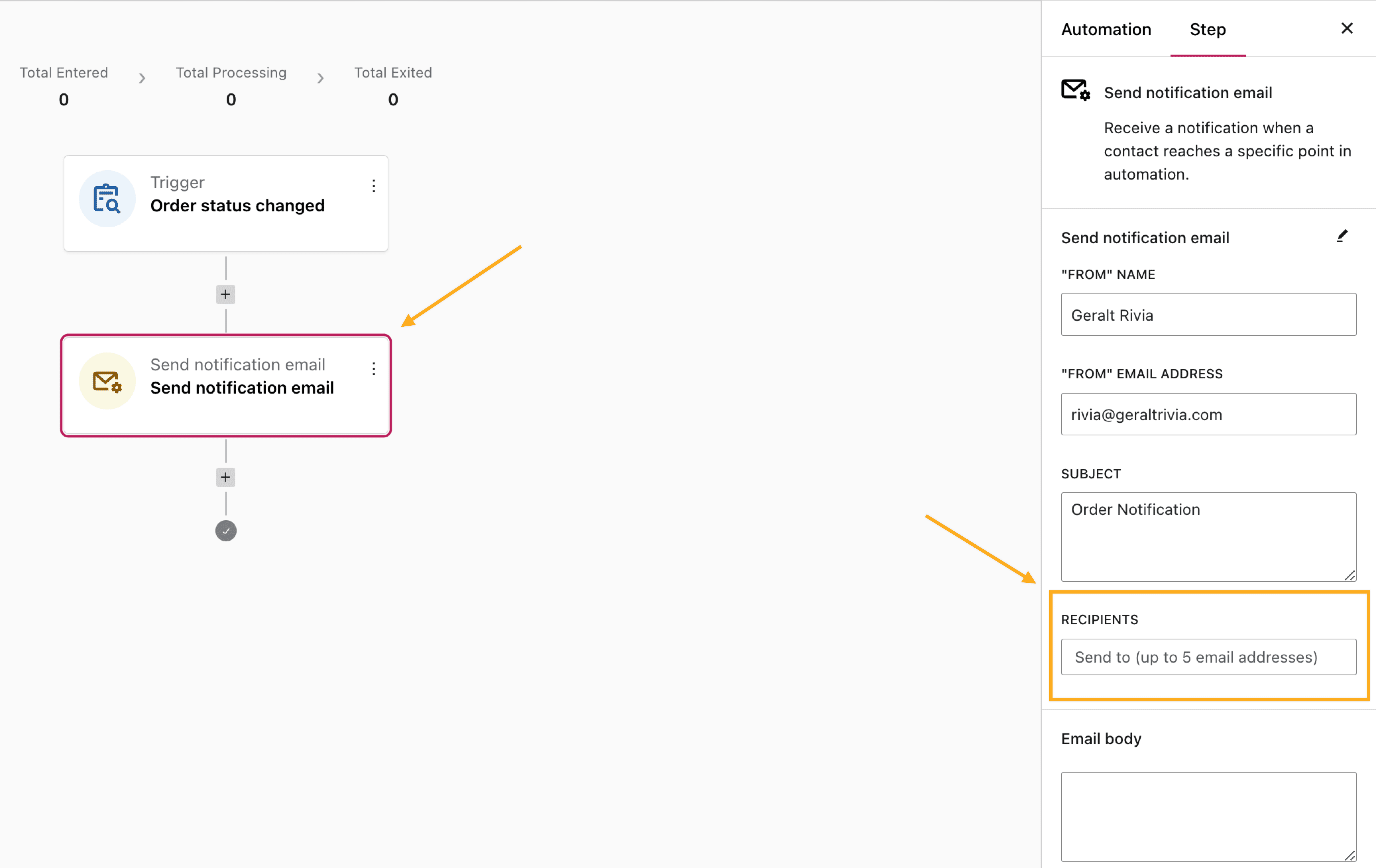
2. Set Up Email Forwarding: Another option is to use email forwarding. This way, you can direct emails sent to a primary email address to other team members. For instance, if all order notifications go to admin@yourstore.com, you can set up forwarding from this address to other team members who need to be in the loop.
- Pros: Great for distributing notifications without extra setup in MailPoet.
- Cons: The forwarding setup needs to be done within your email provider, and you’ll need access to the inbox settings.
Limitations of These Workarounds
These workarounds, while helpful, come with their own set of limitations. For instance, automation notifications won’t include detailed order information for WooCommerce—just a heads-up that there’s a new order. Similarly, forwarding emails requires some manual configuration outside of MailPoet. However, these methods can be valuable if you’re looking for quick solutions to keep multiple recipients informed.
FAQs
Q: Can I add CC or BCC directly in MailPoet emails?
A: Currently, MailPoet doesn’t support CC, BCC, or multiple TO addresses. Automations or email forwarding are the main workarounds.
Q: Will automation notifications include order details?
A: No, the notifications are basic alerts as you can only set up an “Email Body” which can only include a “notification” text For order details, you’ll need to log in to WooCommerce.
Q: How many recipients can I add in an automation notification?
A: You can add up to 5 recipients.